
Getting Started: Working with People
People are the heart of every family tree in FamYarn. This guide walks you through the basics: adding someone, finding them again later, and seeing how everyone connects.
Add your first person
Every tree starts with a single person — it could be you, a parent, or anyone you’d like to build from. When you begin, choose Start with a person, type a name and tap Add to my tree: the name is all it needs, and you can come back and fill in dates, places, and stories later. After that, Add a person asks who the new person is related to and how. Choose a starting person and a relationship, or No one yet to add someone without a family connection. Then enter their name. Before you add them, the preview shows both people and the connection. You can add more relatives from the new person’s page. When photo details are enabled, FamYarn can suggest captions and descriptions. If your photo-analysis allowance is used up while adding your first person, the paused note offers Start Free Trial or Upgrade. It opens separately, keeping your person and photo draft in place.
Add more if you like offers Life story, Military service and Another event in each person form. When adding a relative, How sure are you? and Note about this connection describe the relationship. Optional details wait until you add the person. If you switch to someone already in the tree, Confirm lists the optional events, military service and life story that will be added. The life story appends to theirs; their name, sex, birth and death details, and photo stay as they are.
Browse everyone on the People page
The People page lists everyone you’ve added. Each person appears as a card with their photo, name, and birth year, so you can scan the whole family at a glance.

When your family grows, use the search box to jump to someone by name, or filter by a year, decade, place, or sex to narrow things down. Filters apply a moment after you stop typing, and Clear removes them all. On a small screen, the filter button beside the name folds the filters away and counts the ones that are on. You can also switch between Big picture cards and a compact Small List view, whichever makes scanning easier.
See how people connect
The Family Tree chart shows how everyone fits together across generations. Relationship lines link parents, children, and partners, so you can follow a branch from one person to the next.
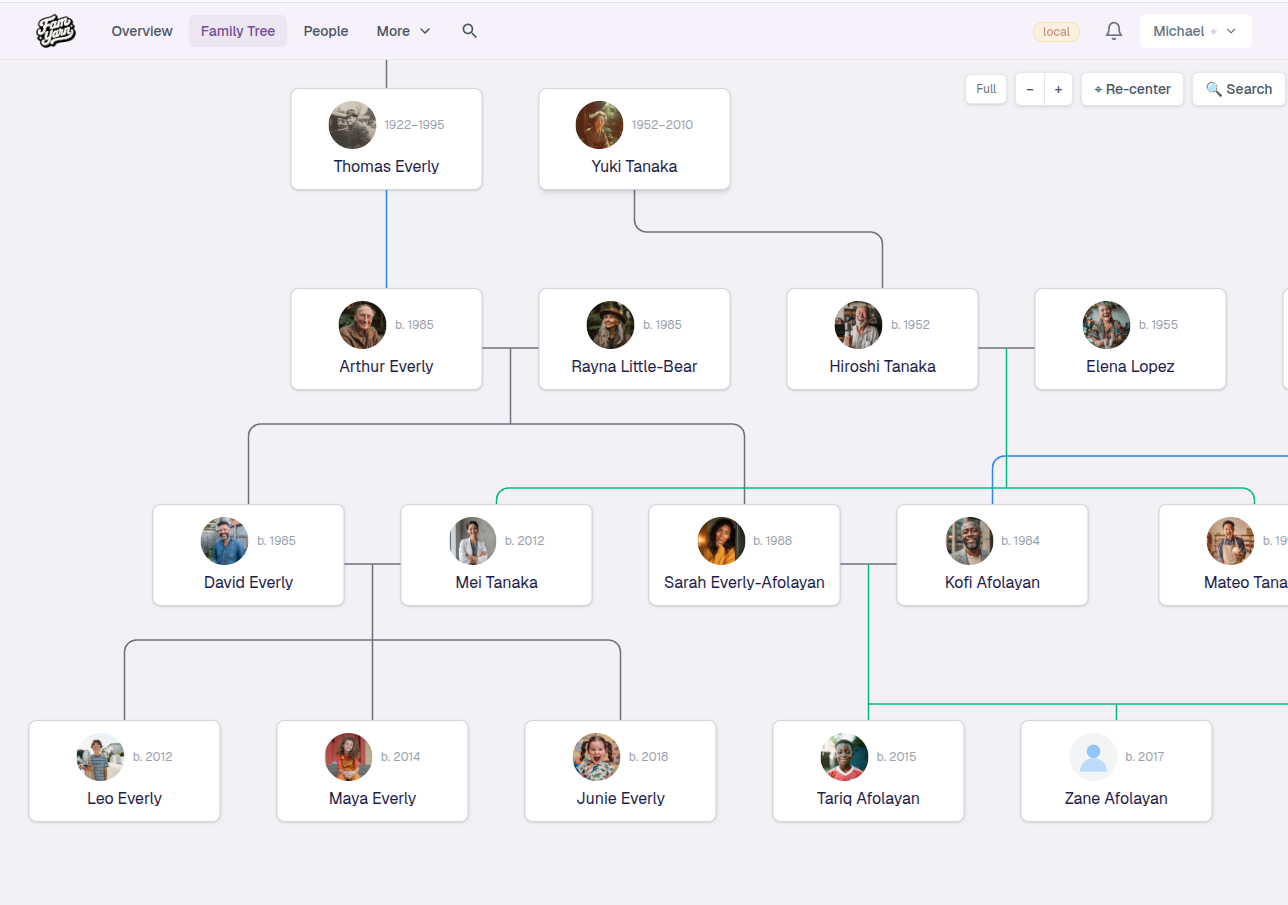
Drag to move around the chart and zoom in to focus on one branch. Select a person to open their actions, then choose View profile to add events, stories, and photos that bring their life into focus. On a phone, the actions open in a sheet; on a larger screen, they open beside the person. In this chart groups the actions for exploring family connections and changing the chart’s starting person.
Tell a person’s story
Names and dates say who someone was. A story says what they were like.
Adding a story requires edit access. While your access is being checked, saving pauses and your draft is kept.
On a computer or tablet, use the Stories section on the person’s page. When it is empty, it shows a question about them or Add the first story, depending on the width of your screen. Choosing the question lets you Write it, or Dictate it or Interview them when those are offered. When they already have stories, View all opens the full list.
On a phone, choose Record a story on their page, then Write it. Add a story opens with this person already selected. Back returns to their page; once you have started writing, Cancel asks before discarding your changes.
A person’s Stories page lists every story about them. Stories with photographs may appear as pairs of tiles, and the rest as rows with a short preview. Tap one to read it, or choose Add a story to write another. Previous and Next move through longer lists.
Where to go next
Once you’re comfortable adding and browsing people, explore the other building blocks of your tree — places, sources, and heirlooms — each of which helps tell a fuller story about the people you’ve added.
If saving stops after a person has been added, choose Try again to finish the remaining steps. In Add relative, Open saved person takes you to their page to finish there. Closing the first-person form also opens the person already saved.
Keep the form open when retrying optional events or the new person’s own life records: the retry finishes the same record even if its earlier save succeeded but the reply was lost. If an event changed after that attempt, restore its earlier values to finish, then edit the saved record from Events.
When choosing someone already in your tree in Add a person, use Year or decade and Place to narrow the search. You can search with just a filter. Remove a filter or choose Clear all to return to the broader choices.